
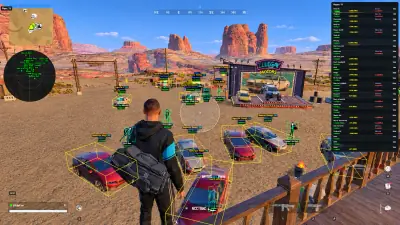
Rob Run Mod Menu: What Should a Proper Interface Explain?
Explore ROB RUN mod menu terminology, feature categories, interface controls and the difference between a menu preview and confirmed functionality.
Rob Run Cheats writes these notes from the current Windows menu. The byline is the shop, and a guide gets a new updated date only when its text changes.
A screenshot of a polished mod menu can look convincing. But interface design and working functionality are two different things. A proper product description needs to explain what the available sections actually represent.
What Is a Mod Menu?
A mod menu is an interface associated with third-party modification software. It may organise advertised features into combat, visual, radar, cosmetic or general categories.
Feature Categories
Typical cheat interfaces may contain sections for:
- Targeting-related controls.
- Visual information.
- Object labels.
- General software settings.
- Connection and application status.
Only confirmed features should appear in product documentation.
Does a Visible Toggle Prove a Feature Works?
No. A visible control or label establishes what an interface displays, not whether the underlying function operates correctly. This distinction also applies to prediction interfaces and live-status badges, such as the roulette predictor.
External delivery
Some menus load from external cheat processes rather than injecting into the game directly. Architecture labels do not replace feature documentation.
Product Presentation
Use original screenshots from RobRun-Hack.net and explain their visible contents accurately. Avoid borrowing interface screenshots from unrelated cheat providers.