
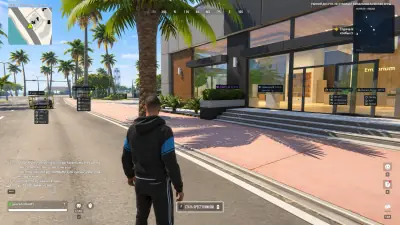
Rob Run ESP, wallhack, loot, vehicles, and role markers
One guide to Rob Run player markers, role tags, vehicle markers, loot and world labels, and highlight styles, and how they differ from a wallhack.
Rob Run Cheats writes these notes from the current Windows menu. The byline is the shop, and a guide gets a new updated date only when its text changes.
Rob Run cheats use several overlays that people lump together as ESP or a wallhack. They are not the same control. Player markers name who is on screen. Role tags split cops, robbers, and other characters. Vehicle markers sit on cars. Loot and world labels sit on cash, containers, and cameras. A highlight, sometimes called chams, changes how a model is drawn. This page is the one guide for that set. A wallhack, in the way players use the word, means you can read those markers through geometry. The information is still the marker. The wall is only the reason you can see it from the other side. Aimbot is a different tab. Radar is a map, not an in-world box. The roulette predictor does not draw any of this.
Player markers
Player markers are the boxes, skeletons, names, health, weapon, and distance on characters. Box style and skeleton style are two drawings of the same idea: where that character is, and how far. Distance fade and a visible-check belong with this group when the menu offers them. A marker you can see through a wall is the wallhack-style use of player ESP. A marker you could already see in the open is the same feature with the wall taken out of the sentence. These labels do not fire the gun. They also do not tell you which fight is a good idea. A full street of boxes is a lot of noise. Battle mode, on the same menu, is the switch that drops world clutter when the fight is already on top of you.
Police and role markers
Rob Run rounds are cops and robbers, not two identical teams. Role tags are the part of player ESP that says which side a character is on. Police markers, cop tags, and robber tags are that same role line. Color and icon follow the role. They do not add a second skeleton. Use the role tag to decide who you are looking at before you lean on aimbot filters. The aimbot page covers role filters for shots. This page covers the label you read. A tag can be wrong if the build is stale or the character type is one the current menu does not split out. Treat an unlabeled figure as unknown, not as a free target.
Vehicle markers
Vehicle markers sit on cars and other rides the overlay knows. In a chase they answer which car is a cop unit and which car is the one you are trying to keep. They are not player boxes moved onto the street. A car with no driver still can carry a marker. A player leaning out of a window still carries a player marker. Radar can show vehicles on its own panel when that option is on. That map is the radar guide. The in-world car label is this section. You do not need both sentences to describe one dot.
Loot and world markers
Loot markers highlight cash, containers, and pickups worth stopping for. World markers cover the rest of the interactables the menu is willing to draw, including security cameras inside a job. Loot ESP is this group. It is not a balance editor, and it is not a list of every prop in the map. Turn loot down when you are already in a gunfight. The same streets that pay also hide players. A screen full of pickup labels is how people miss the cop box standing in the doorway. Battle mode exists so you can drop those labels without tearing down player markers.
Base and property markers
Base ESP, in listings, means property: a stash, a owned spot, a place that is not loose loot on the sidewalk. On this menu that information lives with world ESP when the object is one the overlay draws. It is not a separate promise that every apartment and garage is labeled. If a seller uses base ESP and loot ESP as two products, read both as world labels and ask which objects actually get a marker. Loose cash and a property stash can both be world objects. They are not two cheats, and neither one changes what you own.
Chams and highlights
Chams, glow, and similar words mean the model is recolored or filled so it stands out from the wall and the street. That is a drawing style. Player boxes and skeletons can be on at the same time as a highlight, or the menu can offer one of them. A bright fill through a wall is still a wallhack-style visual. It does not add health, role, or distance by itself. Those stay on the marker text. Highlights cost attention and, on a weak PC, frames. If the fill makes the fight harder to read, drop back to boxes and role colors. The useful part is knowing who is there. The fill is optional paint.
What these overlays do not do
- They do not aim, drop recoil, or press fire. Recoil controls are the no-recoil notes.
- They do not add money, dupe items, or unlock a stash you do not have the key for.
- They do not make a hidden player take damage. Seeing a box is not a hit.
- They do not survive a build mismatch. If the homepage build label and your game build disagree, treat every marker as untrusted until that is fixed.
Cloud DMA has to be connected before the full set runs. Stream-proof capture hides the overlay from a recording. It does not change what you see on your own monitor. The main cheats guide is the map of the rest of the menu. This page is only the visual layer.